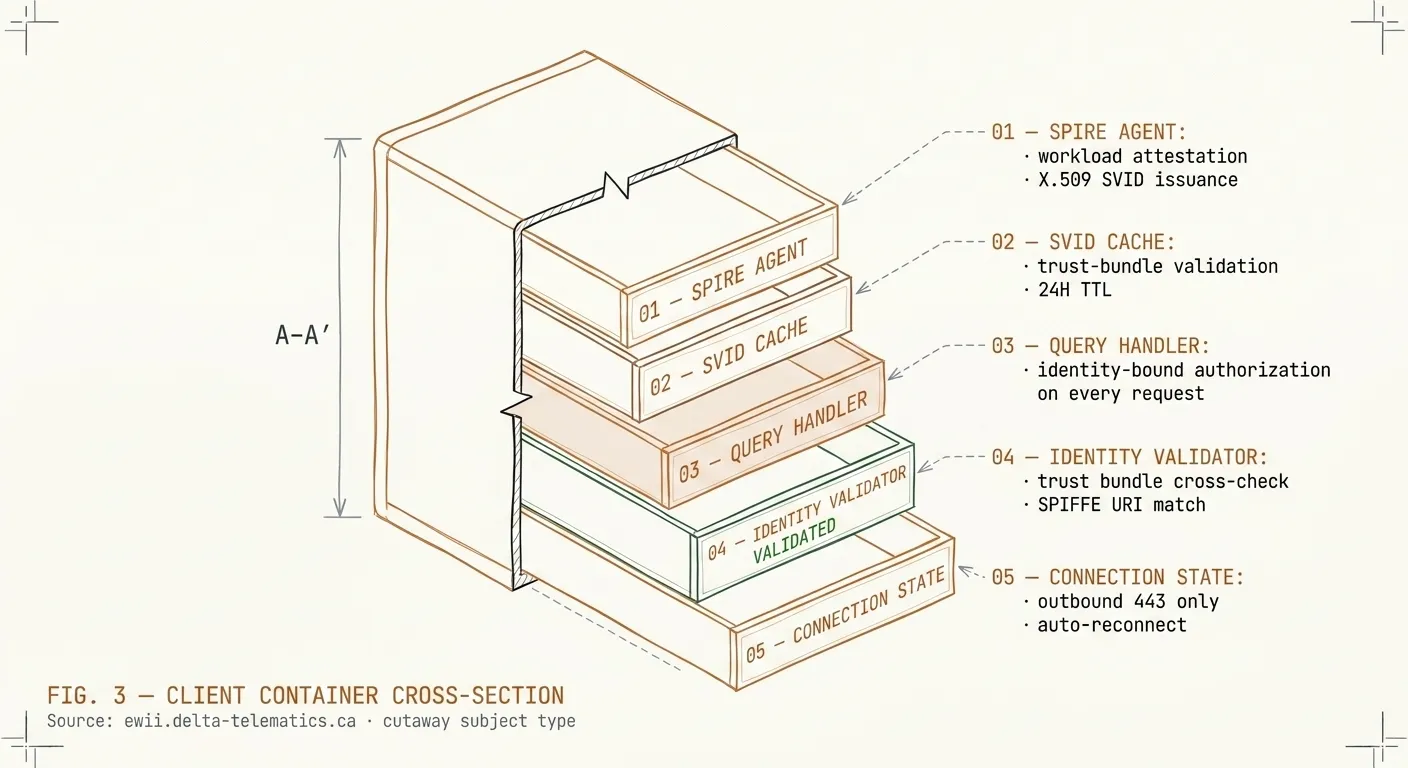
What you’ll deploy when your provider uses Ewii to reach your data.
This page is intentionally written for you — the customer of an operator who has adopted Ewii. Your operator can copy this URL into a change-management ticket. The questions below are the ones a security team typically asks; the answers are the ones we give.
FIG. 1Client container anatomy — four internal subsystems from workload attestation to connection state.
What you’ll deploy
Two signed containers, packaged together as a Docker Compose bundle. Both run as
non-root users on any Linux host with an outbound internet connection. Neither
requires kernel modules, privileged capabilities, or a host-network namespace. Both
image signatures can be verified before deployment with cosign verify.
Client. The QUIC-tunneling component that establishes the single
outbound connection on port 443. Stateless, identity-attested with a SPIFFE / X.509
SVID, around 80 MB.
MCP Adapter. The on-premise protocol adapter that holds your
database connection configuration and credentials, encrypted at rest with
AES-256-GCM. Sits behind the Client on a local Docker network and is never reachable
from the public internet. Includes drivers for PostgreSQL, MySQL/MariaDB, SQL Server,
Oracle, and MongoDB.
A small ZIP package — docker-compose.yml, an .env file with
your enrollment token, a databases.json config, and an
install.sh bootstrap script — brings both containers up with one command.
The package is generated for your specific deployment and signed end-to-end.
What it touches
Only the databases or services your operator has explicitly allow-listed for this
deployment. The Adapter holds the active allow-list; the Client itself does not dial
arbitrary destinations.
The allow-list is operator-mutable through your operator’s admin console — adding a
database, changing a host, or removing one are real operations. Each change is
captured as a structured audit event (timestamp, actor, target, before/after) and your
local Adapter admin UI shows the current set in real time. The Client cannot reach
destinations outside the active list, but the list itself can change through
auditable operator action.
Where credentials live
Database credentials never leave your premises. The MCP Adapter on your host holds an
AES-256-GCM-encrypted credential store; the encryption key is derived locally from
your enrollment token and workspace identifier via PBKDF2-SHA256. The Hub never
receives plaintext credentials, the relay never sees them, and a compromise of your
operator’s SaaS infrastructure cannot expose them.
Rotating a credential is a local action — change it in your local Adapter admin UI (or
re-deploy the package with a new databases.json) and the new value is
immediately in effect. No round-trip to your operator is required, and no plaintext
version is logged or transmitted at any point.
What goes outbound
One connection. Port 443 — the same port your browsers use. ChaCha20-Poly1305-encrypted
payloads inside QUIC + TLS 1.3. No second connection, no fallback channel, no
out-of-band telemetry.
The primary, stable identifier for the destination is a domain name. Relay nodes scale
horizontally inside each region, so the underlying IP set is not a fixed list. For
firewall postures that cannot allow-list by hostname, we publish the current relay
address ranges in the Trust Center pack and notify subscribers via
security@delta-telematics.ca ahead of any range change. If your firewall
requires IP allow-listing, raise it at the Architecture Review and we will sequence
the operational playbook with your network team.
How identity works
The Client presents a SPIFFE / X.509 SVID at every connection. The certificate is issued
when you install the Client and rotated automatically every 24 hours. There are no shared
secrets, no static API keys, no long-lived credentials in your environment. If the Client
is compromised, the certificate it holds is replaced within one rotation cycle.
How to revoke access
One command on your side: stop the Client container. The Hub side detects the lost
connection within seconds, and the SPIFFE certificate is added to the revocation list —
even if the Client comes back, the Hub will refuse it. Your operator can also revoke
centrally; you receive a webhook notification when they do. Every connection is logged
with a structured audit record (timestamp, source workload SVID, destination, bytes,
duration). You can have those logs forwarded to your SIEM.