FOR YOUR CUSTOMERS

What you’ll deploy when your provider uses Ewii to reach your data.

This page is intentionally written for you — the customer of an operator who has adopted Ewii. Your operator can copy this URL into a change-management ticket. The questions below are the ones a security team typically asks; the answers are the ones we give.

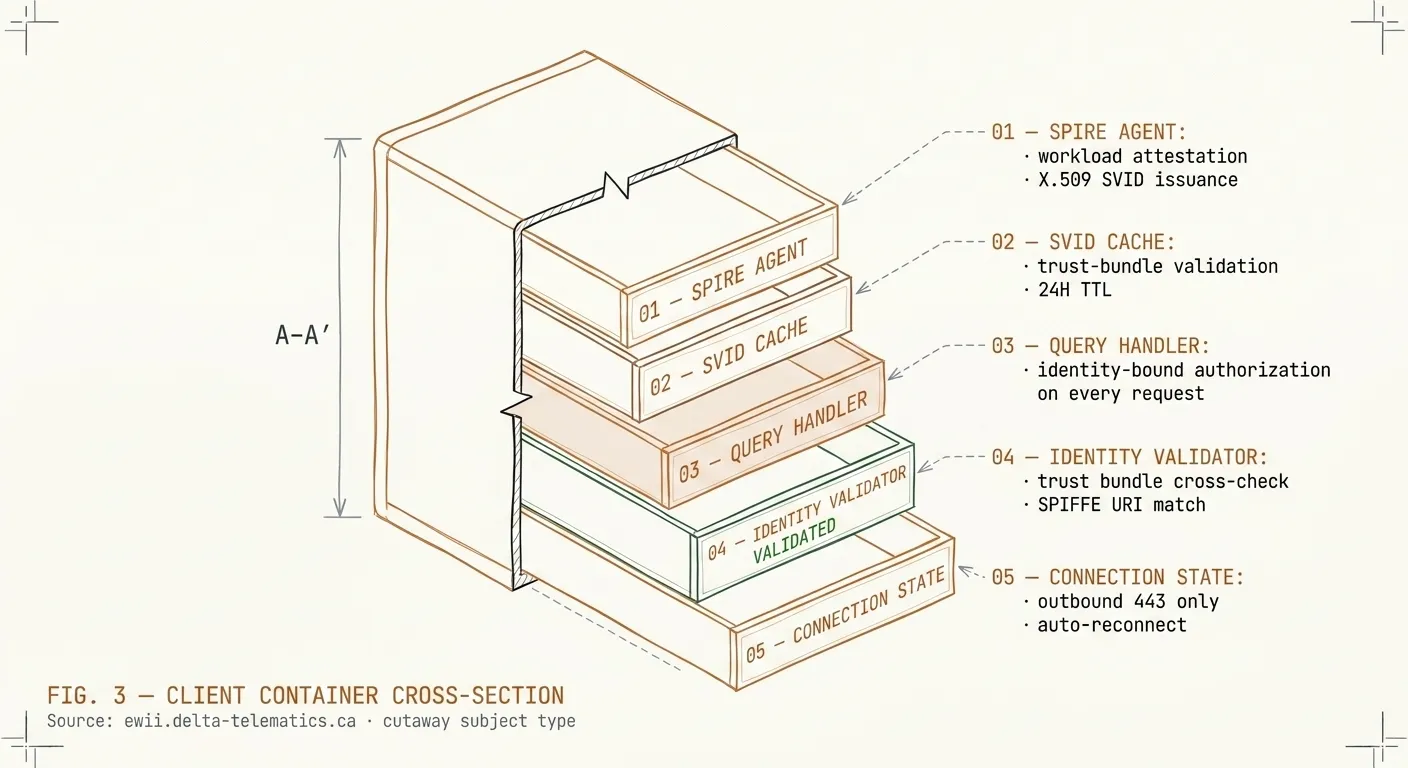
Cutaway cross-section of the Ewii Client container, a stylized rectangular vessel with the front face removed. Four stacked internal subsystems are visible: SPIRE AGENT (workload attestation, X.509 SVID issuance), SVID CACHE (Hub-side trust bundle validation, 24h rotation, shown with a subtle copper-amber tint), QUERY HANDLER (install-time allow-list enforced per query, destination-constrained), and CONNECTION STATE (outbound port 443 only, automatic reconnection, no inbound listener). Dashed leader lines connect each subsystem to labelled callout blocks in the right margin. Section-line indicator A–A marks the cutaway plane.
FIG. 1 Client container anatomy — four internal subsystems from workload attestation to connection state.

What you’ll deploy

A single signed container, roughly 80 MB, that runs on any Linux host with an outbound internet connection. It runs as a non-root user. It does not require kernel modules, privileged capabilities, or a host-network namespace. Image signature can be verified before deployment with cosign verify.

What it touches

Only the database or service your operator needs to reach. Nothing else. The Client is configured at install with the exact endpoint(s) it’s allowed to talk to inside your network. The install-time allow-list is the only set of destinations it dials; nothing outside it is reachable.

What goes outbound

One connection. Port 443 — the same port your browsers use. ChaCha20-Poly1305-encrypted payloads inside QUIC + TLS 1.3. The destination is a domain you can whitelist; we publish a stable IP allow-list if your firewall posture requires it. No second connection, no fallback channel, no out-of-band telemetry.

How identity works

The Client presents a SPIFFE / X.509 SVID at every connection. The certificate is issued when you install the Client and rotated automatically every 24 hours. There are no shared secrets, no static API keys, no long-lived credentials in your environment. If the Client is compromised, the certificate it holds is replaced within one rotation cycle.

How to revoke access

One command on your side: stop the Client container. The Hub side detects the lost connection within seconds, and the SPIFFE certificate is added to the revocation list — even if the Client comes back, the Hub will refuse it. Your operator can also revoke centrally; you receive a webhook notification when they do. Every connection is logged with a structured audit record (timestamp, source workload SVID, destination, bytes, duration). You can have those logs forwarded to your SIEM.