Hub on your side. Client on theirs. Identity-verified queries on 443.
Ewii is a productized connectivity layer for AI and SaaS operators. You deploy a Hub. Your customers deploy a signed Client container. Traffic flows over a single, identity-verified outbound connection. No inbound firewall changes. No shared secrets.
FIG. 1Hub-Client handshake and query path
01
You deploy the Hub.
The Hub runs in your infrastructure — your VPC, your Kubernetes cluster, your bare-metal.
It’s multi-tenant by design: a single Hub serves many customers, each cryptographically
isolated from the others. You set the SLA target. You set the observability stack. We ship
the binary, the OCI image, and the operational runbook.
02
Your customers deploy the Client and the MCP Adapter.
Each customer runs two signed containers in their own network, packaged together as a
Docker Compose bundle. The Client opens a single outbound connection
on port 443 — the same port their browsers use — and presents a SPIFFE / X.509 SVID at
handshake. No inbound firewall rules, no port-forwarding, no DMZ. The
MCP Adapter sits behind the Client on a local Docker network, holds
the per-deployment database configuration and credentials encrypted at rest with
AES-256-GCM, and is never reachable from the public internet. Both images are signed
with Cosign; their security team can verify provenance with cosign verify
before deployment.
03
Encrypted, identity-verified traffic flows.
The Client presents a SPIFFE / X.509 SVID at handshake; the Hub verifies it against the
workspace’s trust bundle. Application-layer payloads are encrypted with
ChaCha20-Poly1305 over QUIC + TLS 1.3, with X25519 ephemeral key exchange and
HKDF-SHA256 derivation. Session keys derived from the authenticated identity bind every
subsequent payload to that identity. A compromised relay cannot read payloads.
Replay-protection is enforced via a sliding window on the receiving end.
ONE WORKSPACE, MANY DEPLOYMENTS
Cryptographically isolated deployments inside a single workspace.
A customer rarely has one database in one place. They have a production cluster in one
region, a staging environment in another, an analytics warehouse in a third. Ewii’s data
model matches this. A workspace is the unit of customer identity in the
Hub. A deployment is one Client + one MCP Adapter installed alongside
one set of databases — typically one per environment or one per site.
Each deployment receives its own SPIFFE / X.509 identity. Session keys are derived
independently. A compromise of one deployment’s Client cannot reach databases attached to
another deployment in the same workspace. There is no shared-key code path that traverses
deployment boundaries — the isolation is cryptographic, not policy-enforced.
The MCP tools advertised by each deployment are a union of the databases attached to that
deployment. Adding a database to a deployment expands its tool catalog; removing one
contracts it. Workspaces and deployments scale independently — your customer can run as
many of either as their environment requires.
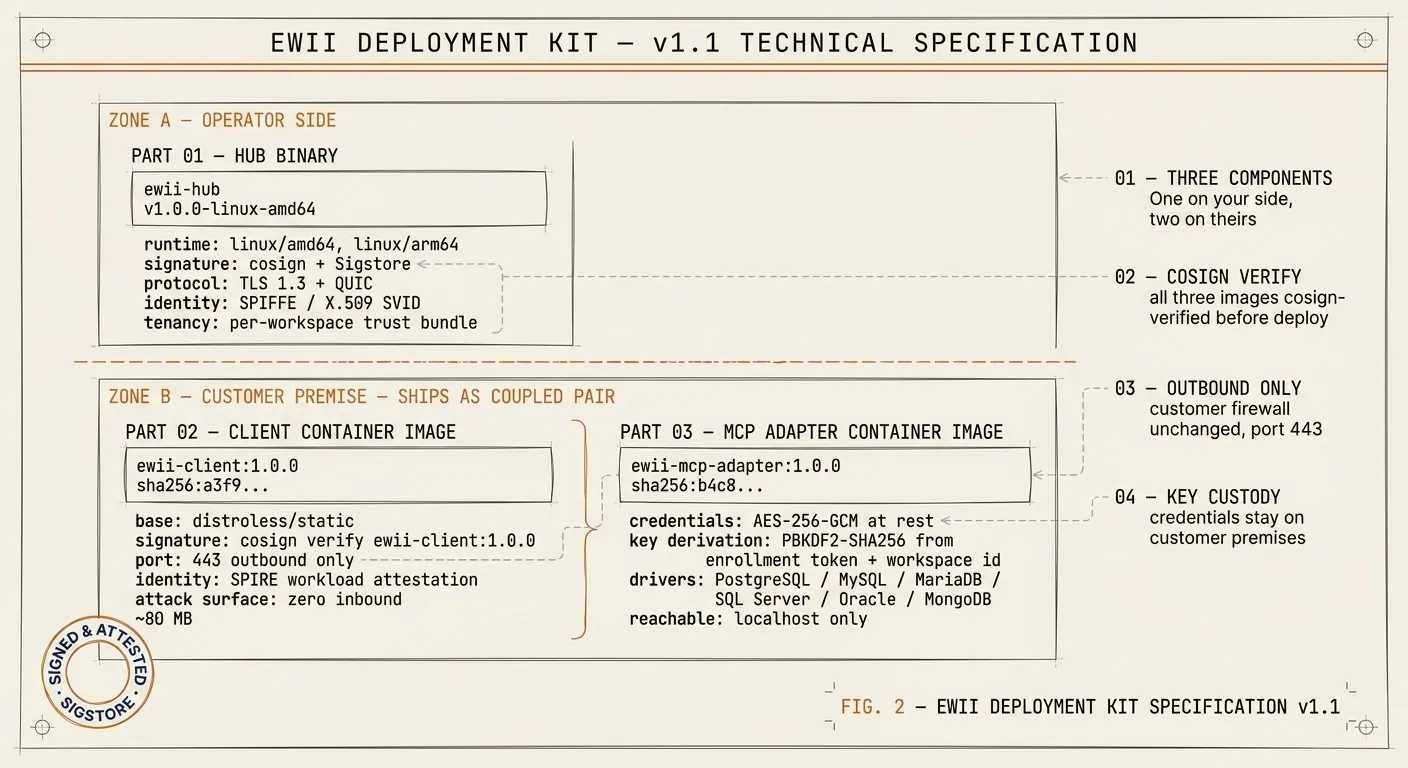
WHAT YOU GET
A three-component deployment kit.
FIG. 2Ewii deployment kit specification — Zone A (Hub) on your side; Zone B (Client + MCP Adapter, shipped as a coupled pair) on theirs.
Zone A — Part 01 — Hub. Lives on your infrastructure.
Zone B — Part 02 — Client and
Part 03 — MCP Adapter ship together as a single Docker Compose bundle
to your customer and run as a coupled pair on their host. Adapter holds an
AES-256-GCM-encrypted credential store; the encryption key is derived locally on the
customer's premises and never reaches your infrastructure.
What this means for your roadmap.
If you’re building an AI or SaaS product that touches customer data on customer infrastructure, Ewii is the connectivity layer you don’t have to build yourself. Schedule a 60-minute Architecture Review with our senior architect and security lead.